Modern Process Digitization, Part 1
Digitization in everyday business: A guide for business leaders
In today's technology-driven world, digitizing business processes has become a must. In this article I show you how to optimize your business processes with modern tools like ePost and Azure Logic Apps.
Why process digitization?
The shortage of skilled workers is a growing challenge. This is where process digitization comes in: it helps companies become more efficient and competitive and make up for the lack of qualified staff. Automated systems, cloud-based solutions and innovative algorithms can help companies optimize their workflows.
A practical example: ePost digitization
At unscripted we use ePost, a service from Swiss Post that scans your physical letters and makes them available digitally. But like many SaaS solutions, ePost has its limits. The main problem is data silos.
The solution: Integration with Azure Logic Apps
Azure Logic Apps is a no/low-code platform that makes integration easy. With it we can download data from ePost and store it in our own document storage.
Implementation
Documenting the process
To digitize the process, we identify the services to integrate: ePost and SharePoint (our document storage). To visualize it, I drew the process.

To make the process even more efficient, we only download the new documents from ePost, as shown in the following process.

Implementing the process
If you want to skip the technical details, you can go straight to the next section.
To model the process in an Azure Logic App, we use the standard connector for SharePoint. There is no standard connector for ePost, so here we have to use the ePost API.
In the publicly available API documentation for ePost (some SaaS vendors could learn from this), we find the API endpoints we need: /epost/v2/letters and /epost/v2/letters/{letter-id}/content.
Filtering for new documents
We filter documents by date so we only download new ones. Since the Azure Logic App has no data persistence, we use the creation date of the newest file in the target folder and set the filter to the following day. Alternatively, we could use Azure SQL, Blob Storage or a text file on SharePoint for this.
Authentication
For authentication in SharePoint we use the built-in Azure Logic App connector, which uses OAuth. A dedicated user with restricted access is recommended. The ePost API needs an API key, which we store securely in Azure Key Vault. Authentication for the Key Vault works through its access policies and the managed identity of the Azure Logic App.
Azure Logic App workflow
Now we can digitize our process with the Azure Logic App Designer! You can see what that looks like in the following figure.
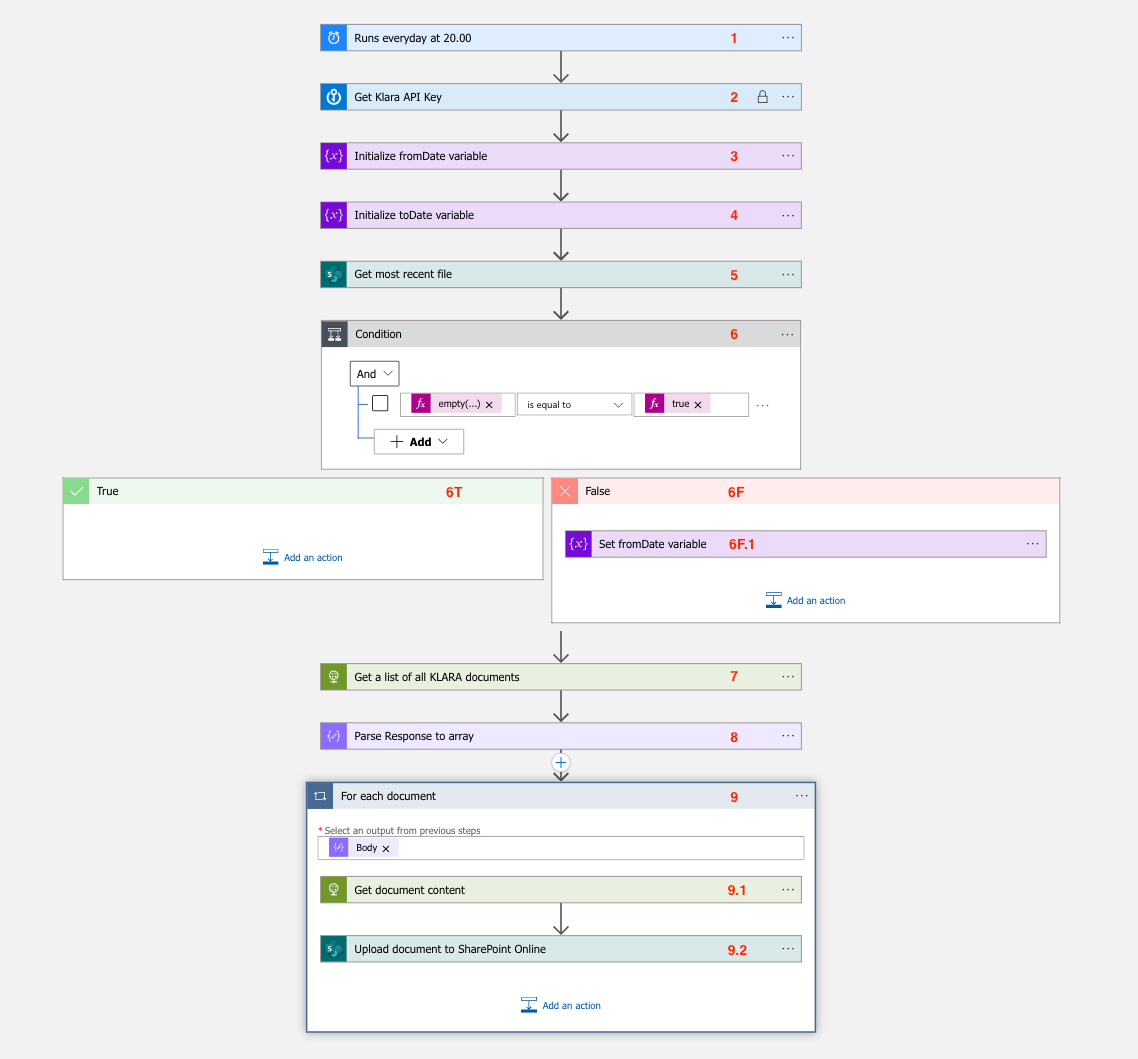
Let's go through the individual process steps.
| Step | Type | Description |
|---|---|---|
| 1 | Trigger | Daily start at 22:00. |
| 2 | Key Vault action | Read the API key for the ePost API. |
| 3 | Initialize variable | Set fromDate to 1970-01-01. |
| 4 | Initialize variable | Define toDate (the API requires it even though it is redundant). |
| 5 | SharePoint action | Get the newest files in the folder. |
| 6 | Conditional | Check: Is the file list empty? |
| 6T | Conditional - True | Empty list: no action. |
| 6F | Conditional - False | Actions for a non-empty list. |
| 6F.1 | Conditional - False | Set fromDate to the day after the newest file. |
| 7 | HTTP Request | Get the document list via /epost/v2/letters. |
| 8 | Parse JSON | Convert the response to JSON. |
| 9 | For-each loop | Iterate through the document list. |
| 9.1 | HTTP Request | Get the document content via /epost/v2/letters/{letter-id}/content. |
| 9.2 | SharePoint action | Upload the document to SharePoint with timestamp and title. |
Test run
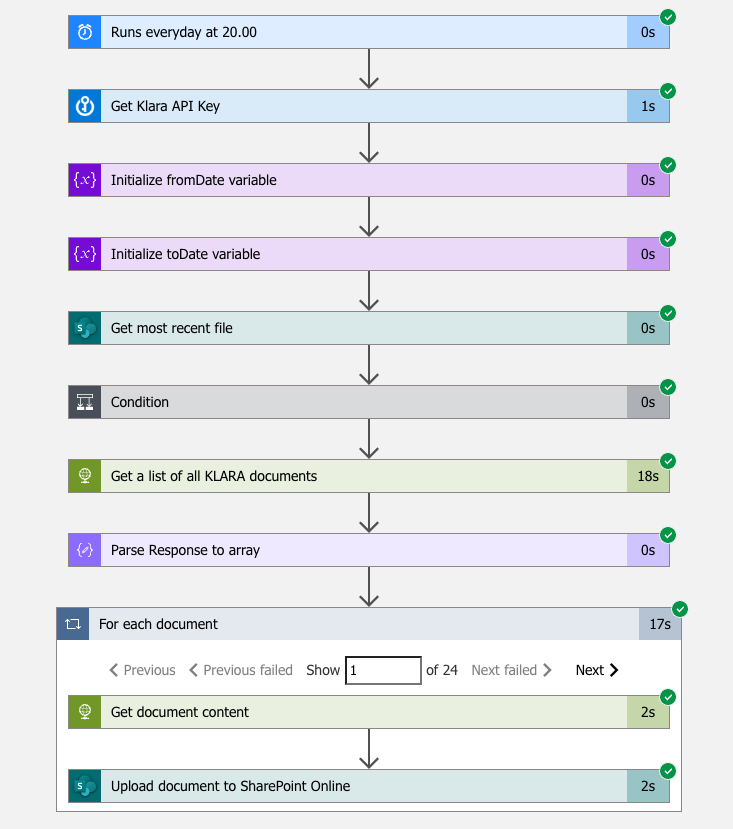
Once the workflow and authentication are configured, we can test. The screenshot shows every step running successfully and the for-each loop running 24 times for 24 documents.
Result
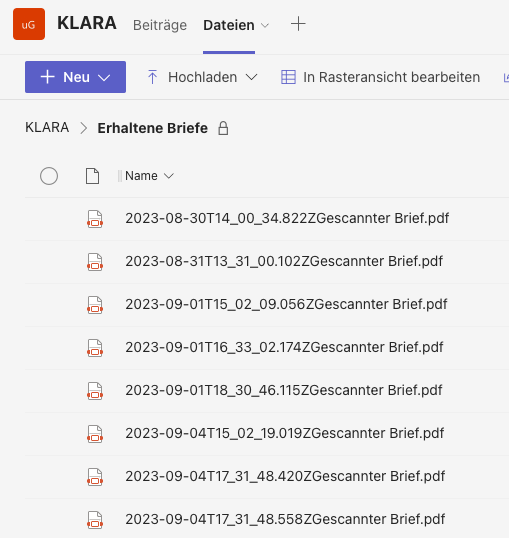
At the end of our implementation we have a folder full of downloaded documents that are accessible without an ePost login.
However, all letters have the same title: "Gescannter Brief" (German for "scanned letter"). That makes it hard to identify individual documents, because we have to open each PDF to see what it is about. This comes from ePost's default naming. In the next blog post we will use AI technology to solve this problem.
Conclusion
Digitizing business processes has become a necessity. With the right tools and a clear understanding of the underlying processes, you too can benefit from digitization.
Implementing a process like this doesn't have to be expensive and can be done quickly. If your company faces similar challenges, send me an email.
In the second part of this blog post we make the process "smart" by using AI services.

About the author
Loris Scandurra
As an expert in Azure and AI solutions, I help modern companies transform their business processes with new technology. With years of experience in cloud development and artificial intelligence, I help you get the full value out of digital solutions.
Get in touch